
Chara Sheet
When making source sheets, you must copy the first 3 rows of the official source sheet completely and start your data at the 4th row.
About columns, empty rows and empty cells
Missing columns are filled with empty values — the game logs a #source ill-format warning (visible in Player.log) and keeps loading. Reordered columns are re-mapped by header name automatically. Still, copy the whole official header row as-is; it avoids both paths entirely.
A row with an empty id aborts the rest of the sheet, every row after it is skipped, again with no warning. Do not use blank rows to group your data unless intentionally.
An empty cell is not an empty value — the game falls back to the default on row 3. race defaults to norland, job to none, category to chara, _idRenderData to chara, LV to 1, chance to 100, tiles and colorMod to 0.
You can change your default row 3 values to apply it to all other rows. Your data should start at the 4th row.
Sheet Columns
| Column | Type | Description |
|---|---|---|
| id | string | The most important cell of an entry that distinguishes it from everything else on the Chara sheet. If the ID matches a vanilla entry's or another mod's entry's ID, the last sheet to load will override the others. This value cannot have any spaces in it, consider using snake_case style if needed, e.g. mymod_chara_yajyuu_senpai. |
| _id | integer | Used for sorting purposes in creature codex, can be any numeric value. This does not have to be unique. |
| name_JP | string | The Chara's in-name display name in Japanese. |
| name | string | The Chara's in-game display name in English. Other languages use SourceLocalization.json. |
| aka_JP | string | The Chara's in-name alias/title in Japanese. |
| aka | string | The Chara's in-game alias/title in English. Other languages use SourceLocalization.json. |
| idActor | string[] | Controls whether the Chara uses PCC-part rendering. Example: pcc,unique,jure loads PCC parts from pcc/unique/jure. |
| sort | int | Unused in SourceChara. |
| size | int[] | Tile dimensions occupied by the Chara; usually empty. Example: 2,2 makes the Chara occupy 2×2 tiles and prevents shoving. |
| _idRenderData | string | Controls sprite sheet referencing. chara/chara_L... uses tile IDs from tiles with textures in Texture Replace (limited slots, can be overridden). @chara uses same-ID texture from Texture (mandatory for modded Chara). Note that leaving this blank does not mean "no render data": it falls back to the row-3 default chara, i.e. the tile-sheet mode — which is why a modded Chara without @chara shows the wrong sprite. |
| tiles | int[] | tile IDs for sprite sheet, or skinset for modded Chara. |
| tiles_snow | int[] | Replacement tile sequence when on snowy maps. Modded Chara use variation instead. |
| colorMod | integer | Color saturation modifier. Currently mainly used with 100, allowing grayscale sprites to inherit mainElement color. 0 means no tinting. |
| components | string[] | Unused in SourceChara. |
| defMat | string | Default corpse material, selected from the alias column of the Material sub-sheet within SourceBlock. Leave it empty to use Race's default material. |
| LV | integer | Chara “Danger Level”; affects spawn threshold by map danger, selection cost (slave master/animal tamer), and base stat generation from race/job characteristics. |
| chance | integer | Modifier for map spawn chance (and possibly sale lists). Default 100. |
| quality | integer | Rarity tier; a blank cell counts as 0. When making a mod, pick between 0, 3 and 4 only. 0: regular. 3: Named Monster (name displayed with 《》 around it; fertilized eggs hatch into the same species). 4: Unique Character (name displayed with 『』 around it; fertilized eggs hatch only into chickens; never spawned a second time when a map is regenerated). Neither 3 nor 4 can be captured with a monster ball or tamed, but both can still be recruited through affinity. Any non-0 value keeps the Chara out of random rosters such as the recruit list, hunting quest targets and the slave merchant, and it is never promoted to a random legendary boss. The intermediate 1 and 2 are the tiers the game hands out on its own at spawn time (by 2 the Chara is already uncapturable and its name is shown with 『』); writing them into the sheet only switches that randomness off, so leave them alone. Not required for custom adventurers. |
| hostility | string | Temperament toward player/allies/bystanders. Accepts Enemy / Neutral / Friend / Ally — note that hostile is spelled Enemy, not Hostile. Blank is treated as Enemy. Neutral: does not attack unless attacked. Friend: attacks anyone hostile to Friend units, including player if provoked. |
| biome | string | Restricts random spawning to a single biome. Set it and the Chara only appears in the matching biome; leave it blank for no restriction. This is a yes/no filter, not a weight. Write the biome name (Water, Sand, Plain, …); it is case-sensitive. |
| tag | string[] | Serves two purposes: behavior tags (bare words) and spawn settings (parameterized, see below). Behavior tags come from a fixed list and must be spelled exactly, case included — see the Behavior Tags section and the sections that follow it. |
| trait | string[] | The Chara's trait, mapping to a Trait* C# class (omit the Trait prefix). If your Chara is an adventurer, read the Adventurer section. This column can hold several entries, but only the first one takes effect — the rest are silently ignored. |
| race | string | Select from the Race ID column of SourceRace. Defaults to norland when left blank — a Chara with no race is a norland, not a Chara without a race. |
| job | string | Select from the Job ID column of SourceJob; default is none. This defines your character's class (job). |
| tactics | string | Overrides default tactics of assigned job. |
| aiIdle | string | How the Chara moves while idle. Left blank, it has a small chance to wander each turn; stand stops the wandering; root additionally stops it from following its owner or catching up with the party leader. Must be lowercase — Stand simply does not apply, the Chara wanders as usual, and nothing is reported. |
| aiParam | int[] | Three values: preferred enemy distance, per-turn reposition chance to that distance, and (rarely used) bonus chance to reposition again. |
| actCombat | string[] | Active abilities/spells usable in combat, selected from SourceElement entries and comma-separated. Add /N for fixed use chance. For buffs, add /pt to target whole party (ally state only). Example: ActThrowPotion/30,SpWeakness,SpSpeedDown,SpWisdom/50/pt. Default chance is 100. |
| mainElement | string[] | Primary elemental affinity: Fire, Cold, Lightning, Darkness, Mind, Nether, Nerve, Sound, Chaos, Poison, Holy, Cut, Acid, Impact. You may list several, comma-separated — the game picks one at random, weighted by the Chara's LV against each element's eleP. Add /N to set the element level (default 10), e.g. Poison/80. The value is looked up as ele + the name (Fire → eleFire) in SourceElement's alias column, so a typo throws on spawn. |
| elements | string | Passives, such as feats/enchantments, selected from SourceElement entries and comma-separated. Add /N for level/value where applicable. 0 or negative can modify inherited race elements. Examples: invisibility/1 enables, invisibility/0 disables inherited; antidote/-30 makes meat poisonous, antidote/30 cures poison or offsets racial -30. |
| equip | string | Overrides the randomized job equipment template. Blank follows the job (the equip column on the Job sheet); none skips equipment generation entirely. Only three values actually do anything, and they are case-sensitive and lowercase: archer (bow/crossbow), inquisitor and gunner (gun). A non-empty value also triggers equipment generation on its own, even when the race's EQ is empty. |
| loot | string[] | Extra drops (Thing/ThingV IDs), comma-separated, each one must carry /N — leaving it out is an error. N is per mille: below 1000 it is the chance to drop one (medal/500 = 50%), 1000 and above always drops, with N / 1000 as the guaranteed count and the remainder as the per-mille chance of one extra (medal/3000 = always 3; medal/2500 = 2, plus 50% for a third). Nothing drops for PC-faction charas or in user-made zones. |
| category | string | Most entries use default chara. |
| filter | string[] | Unused in SourceChara. |
| gachaFilter | string[] | Decides whether this Chara can be drawn from the gacha. This column accepts only two values: resident and livestock (both may be listed). The gacha's own category is a separate thing: drawing citizens requires resident, drawing livestock requires livestock, and drawing uniques requires resident and a quality of 4 — there is no Unique or default filter value. |
| tone | string | This column is read in and then never used, so filling it in has no effect. The tone that actually applies is the 5th segment of bio. |
| actIdle | string[] | Out-of-combat behavior. Comma-separate several and the game picks one at random each time. readBook、buffMage / buffThief / buffGuildWatch / buffHealer、torture_snail / janitor / cast、bartender、baker、butcher、banker、fisher |
| lightData | string | The color emitted from light. It works for Chara too — vanilla uses wisp, wisp_bright and fireplace here. |
| idExtra | string | Extra renderdata. Also works for Chara (vanilla: deep_jellyfish). |
| bio | string | Slash-separated values (no spaces): gender (m/f/n), age, height, weight, tone from chara_tone.xlsx, talk from chara_talk.xlsx. Example: f/51044/152/46/friendly|私|あなた. Optional segments may only be dropped from the tail — see The bio Column. |
| faith | string | Fixed religion. Setting this will prevent changing in game. |
| works | string[] | Select from the alias column of SourceHobby. |
| hobbies | string[] | Select from the alias column of SourceHobby. |
| idText | string | Links to an entry in CharaText sheet. For the bubbles that appear above a character's head, see the Barks (Popup) section. |
| moveAnime | string | Move animation type. hop or blank. |
| factory | string[] | Unused in SourceChara. |
| components | string[] | Unused in SourceChara; This is a duplicate column. When a sheet has two columns of the same name, the later one wins. |
| recruitItems | string[] | Special recruit dialog items, only used by mani right now. |
| detail_JP | string | Unused in SourceChara; can be used for notes. |
| detail | string | Unused in SourceChara; can be used for notes. |
The bio Column
gender/age/height/weight/tone/talkNo segment is strictly required, and the optional segments may only be dropped from the tail. f////friendly does not work.
gender (m / f / n) deserves a note of its own, because "blank" means two different things:
- Leave the whole column empty and everything is rolled at random, gender included. This is a perfectly normal way to define a Chara.
- Leave only the first segment empty —
/17/152/46— and it is not random. The game always reads that segment when the column is non-empty, and anything that is neithernnorffalls through to male. An empty gender, or a typo such asM, silently produces a male Chara.
Two more things that are invisible from the sheet:
ageis an age, not a year. The game derives the birth year from it (birth year = current year − age).heightandweighthave no unit attached — they are just two numbers the game shows as-is.- Filling in
ageturns off the random portrait, unless the Chara has therandomPortraittag. Writing an age also makes the game look forData/PCC/<id>.txtbut that can be ignored.
The tone segment can itself be split with |:
toneId|firstPerson|secondPersontoneId is an id from chara_tone.xlsx (blank behaves as default). The other two replace the first and second person pronouns in the Chara's lines, but that substitution only happens in Japanese — they do nothing in any other language.
This column has nothing to do with addBio(ID) and bio_ID.json further below: this one is the set of parameters used to generate the Chara, the other one is the biography text shown in the character sheet.
Behavior Tags
Bare words in the tag column — the ones without parentheses — are behavior tags. The usable tags are the fixed list below, and the spelling has to match exactly, case included; one wrong letter simply means the tag is not there, and nothing is reported.
This list is shared with items
The same list is used by items and Charas, so quite a few of the values below (seed, gift, currency, dish_bonus, …) only mean something on items and do nothing on a Chara.
important, repeatSwing, nonHold, nonPick, canMelee, boss, currency, randomName,
noDrop, hidden, wilds, neg, replica, seed, rareSeed, gift, ignoreUse,
throwWeapon, throwWeaponEnemy, notHumanMeat, noRandomProduct, suicide, kamikaze,
randomSkin, noPortrait, randomPortrait, rareResource, tourism, staticSkin,
godArtifact, noWish, dish_bonus, dish_fail, random_color, noRandomEnc, noMix,
bigFish, noSkinRecipe, animal, human, undead, machine, horror, fish, fairy, god,
dragon, plant, antiSpider, shield, humanSpeak, throwBall, alwaysDropCorpse,
allowDevour, noRide, ride, allowIngredientA few of these have a well-defined effect on Charas:
| Tag | Effect |
|---|---|
mini | Height becomes one tenth. |
humanSpeak | Talks without parentheses, see the next section. |
randomPortrait | Keeps the random portrait even when bio has an age (writing an age otherwise turns it off). |
water | Aquatic behavior: the Chara heads for deep water when idle, and will not wander out of deep water onto land. It is also a spawn filter tag, see below. |
The other kind of tag: spawn filters
The tags above are read directly by the game code. There is a second kind that never appears in the code at all — spawn lists select on them by name, along the chain "biome → spawn list → tag":
Snow (biome) → spawn list c_snow → requires tag snow, excludes tag neutralFiltering looks at both the Chara's own tag and the tag of its Race; either one counts. The common ones are:
| Tag | Effect |
|---|---|
snow | Joins the snow biome's spawn pool; also excluded from the wilderness and dungeon lists. |
sand | Joins the sand biome's spawn pool. |
water | Joins the water biome's spawn pool. |
randomFish | Joins the pool of things you can catch while fishing. |
neutral | Joins the neutral spawn pool (guests, townsfolk). The most used tag in the base game. |
pawn | Joins the pawn spawn pool. |
Leave it blank and the Chara joins no tag-filtered list. This family is defined by data, so a mod can ship its own spawn lists and invent its own tag names — the table above is only what the base game uses.
Allow Human Speak
To allow your character to talk without parentheses, you can add tag humanSpeak in SourceChara sheet. Alternatively you can add tag human or humanSpeak in the SourceRace sheet.
Spawn Setting
We use tag column to define a Chara's spawn settings.
Migrating From CWL
CWL specs are removed from the wiki, but they are still compatible. We recommend switching to the new format.
Possible tag actions:
addZone(zoneId@level)addEq(ItemId#Rarity)/addEquipment(ItemId#Rarity)addThing(ItemId#Count)addFlag(FlagName)/addInt(FlagName=1)addFlagValue(FlagName=some_value)/addStr(FlagName=some_value)addBio(BioFileId)/addBiography(BioFileId)addStock(StockFileId)addDrama(DramaFileId)
Detailed explanations are given below.
Zone Spawn
To spawn the character to a zone, add tag addZone(*) to the SourceChara row and replace the * (asterisk) with zone id or keep the asterisk for a random zone. You may also specify zone level with @n.
For example, to spawn the chara in little garden, use addZone(little_garden). To also spawn in derphy underground, use another tag addZone(derphy@-1). Check the SourceGame/Zone and reference the id column.
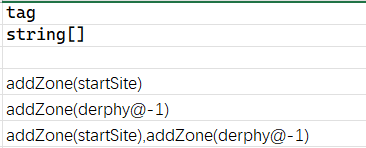
For each addZone tag used, an instance of the Chara will be spawned there. For example, addZone(lumiest),addZone(little_garden),addZone(specwing),addZone(*) will make sure all three selected zones plus a random zone will have this character spawned (as duplicates).
Add Equipment/Thing
When spawning your character, you may also define the starting equipments and things for this character.
To assign specific equipment to the character, use tag addEq(ItemID#Rarity) or addEquipment(ItemID#Rarity), where ItemID is replaced by the item's ID, and Rarity being one of the following: Random, Crude, Normal, Superior, Legendary, Mythical, Artifact. If #Rarity is omitted, the default rarity #Random will be used.
The rarity text in game is displayed as: Crude, Normal, Good, Miracle, Godly, Special
For example, to set a miracle BS_Flydragonsword and a random axe_machine as the main weapons for the character:
addEq(BS_Flydragonsword#Legendary),addEq(axe_machine)To add starting items to the character, use tag addThing(ItemID#Count). If #Count is omitted, a default of 1 item will be generated.
For example, to add padoru_gift x10 and scroll of ally x5 to the character:
addThing(padoru_gift#10),addThing(1174#5)Remember, tags are separated by , (comma) with no spaces in between.
Adventurer
Migrating From CWL
CWL specs used AdventurerBacker, which will still function the same as before. We recommend switching to the new format.
If your character's trait column is filled in with AdventurerCustom, the character will be imported as an adventurer, which will appear on the adventurer ranking list.
Merchant Stock
You can define a custom merchant stock using tag addStock and a simple JSON file placed in your LangMod/**/Data/ folder, with the name stock_ID.json. The ID is the unique identifier for this stock file or character. For example: stock_my_cnpc_id.json or stock_unique_armor.json.
When using the addStock tag without specifying ID, it will default to the character ID. You may also specify and/or combine multiple stock files using multiple tags, such as: addStock,addStock(unique_items),addStock(unique_armor).
Stock File
Within the stock JSON file, the structure is as follows:
{
  "Items": [
    {
      "Id": "example_item",
      "Material": "",
      "Num": 1,
      "Restock": true,
      "Type": "Item",
      "Rarity": "Random",
      "IdentifyLevel": "Identified"
    },
    {
      "Id": "example_item_limited",
      "Material": "granite",
      "Num": 1,
      "Restock": false,
      "Type": "Item",
      "Rarity": "Artifact",
      "IdentifyLevel": "Identified"
    },
    {
      "Id": "example_item_craftable",
      "Material": "",
      "Num": 1,
      "Restock": false,
      "Type": "Recipe",
      "Rarity": "Random",
      "IdentifyLevel": "Identified"
    },
    {
      "Id": "SpShutterHex",
      "Num": 5,
      "Type": "Spell"
    }
  ]
}Field name casing does not matter
The game reads these field names case-insensitively, so both Items and items, Id and id, work fine. This page capitalizes them consistently; existing mods use both styles, and either is fine to keep.
Itemsis an array of items in the stock.Id
The ID of the item (Thing). This field is required.
For some stock types, this can be an alias of an element or a numeric ID, or a name.Material
The material the item is made of. Leave it blank to use the default material defined in the Thing data.
Default value:""Num
The number of items.
Default value:1Lv
The item level. Leave it at-1to follow the shop level, or set a value to override it.
Default value:-1Restock
Determines whether the item restocks.
Set tofalsefor limited items that can only be purchased once.
Default value:trueTypeSee the type description table below.Rarity
Possible values:Random,Crude,Normal,Superior,Legendary,Mythical,Artifact
Default value:NormalIdentifyLevel
Determines the initial identification state of the item.
Possible values:Identified,RequireSuperiorIdentify,KnowQuality,Unknown
Default value:IdentifiedBlessedState
Determines the blessed state of the item.
Possible values:Doomed,Cursed,Normal,Blessed
Default value:NormalPriceCalc
Arithmetic calc expression to override the item price.
Arguments:base(base price),lv(item level),rarity(item rarity)
Example:"base * 0.2 + lv * 5"- You can omit any fields to use their default values.
NOTE
NoCopy, NoRandomSocket, Sockets, MapStr and MapInt are properties of registered Thing profiles (Thing sheet tag column), and are not applied to stock-generated items.
Stock Item Types
| Type | Description |
|---|---|
| Item | A standard item. Supports material, level, and stack count. |
| Block | A placeable block item created from a block alias and material. |
| Cassette | A music cassette. If the bgm id is invalid, a random track will be used. |
| Currency | Currency item. Id can be money money2 plat medal casino_coin ecopo. Num defines the amount. |
| Category | Spawn from category. Id is the category name. |
| Filter | Spawn from filter. Id is the filter name. |
| Tag | Spawn from tag. Id is the tag name. |
| Letter | A letter item. Id is the txt id in LangMod/XX/Text/Scroll. |
| Map | A map item. Id is the map id. |
| Perfume | A perfume. Id is the element alias or id. |
| Plan | A plan. Id is the element alias or id. |
| Potion | A potion item. Id is the element alias or id. Num defines stack size. |
| Recipe | A recipe item for crafting. |
| RedBook | A red book item. Id is the txt id in LangMod/XX/Text/Book. |
| Rod | A rod item. Id is the element alias or id. Num defines charges. |
| Rune | A rune item. Id is the element alias or id. |
| RuneFree | A lawless rune item. Id is the element alias or id. |
| Scroll | A scroll item. Id is the element alias or id. |
| Skill | A skill book. Id is the element alias or id. |
| Spell | A spell book. Id is the element alias or id. Num defines the charge. |
| Usuihon | A special item. Id is the religion id. |
If you are not using a code editor, you can use JSONLint to validate your JSON.
Talk & Popups
Barks (Popup)
Sometimes you want the character to banter/bark at certain conditions. The barks pop up above character's head in a speech bubble.
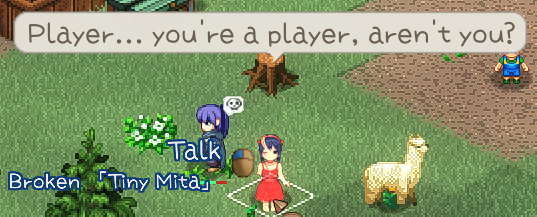
These barks are written in CharaText sheet, and your Chara sheet uses idText cell to link their IDs together.
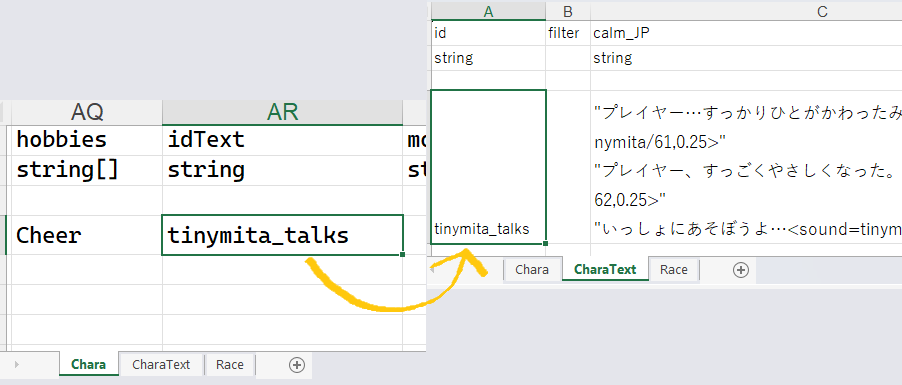
| Column | Condition |
|---|---|
| calm | Idle default |
| fov | On sight |
| aggro | In combat |
| dead | Death rattle |
| kill | Kill confirmed |
Let's Talk
To add some chatty texts to the character for the Let's Talk option, you'll need to use dialog.xlsx file placed in your LangMod/**/Dialog/ folder.
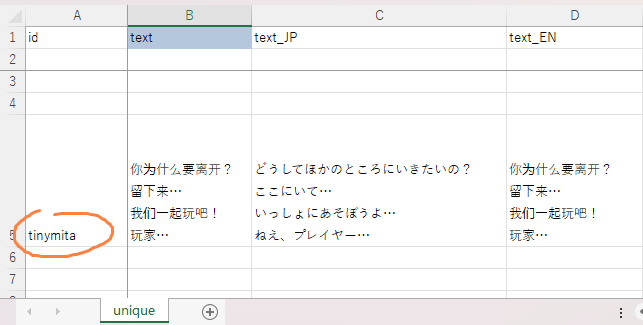
Let's talk texts are line-separated texts in unique sheet and a row with your character's ID.
Format
The data starts at the 5th row.
You can reference the game's dialog sheet at Elin/Package/_Elona/Lang/_Dialog/dialog.xlsx.
Drama
A drama is the rich dialog that usually has options and additional actions.
Drama guides are moved to their new section for now:
Biography
To add more flavor to your character, you may use tag addBio(ID) to define a custom biography. The bio file is (yet another) json file placed in your LangMod/**/Data/ folder, with name bio_ID.json, the ID is the unique ID for this biography file, such as bio_my_chara.json.
You may reuse the same biography file for multiple characters by specifying the same ID.
Within the bio file, it's simply as follows:
{
    "BirthDay": 11,
    "BirthMonth": 4,
    "BirthYear": 514,
    "BirthPlace": "Earth",
    "BirthLocation": "",
    "Mom": "Best Mom",
    "Dad": "Best Dad",
    "Background": "An absolutely normal living being\nBut on ylva...",
    "FavFood": "mushroom_rare",
    "FavCategory": "mushroom",
    "LikeThing": "stethoscope",
    "LikeHobby": "martial"
}FavFood: Thing/ThingV/Food id.FavCategory: Category id.LikeThing: Thing/ThingV/Food id.LikeHobby: Element alias.
If you are not using a code editor, you can use JSONLint to validate your JSON.
Portrait and Sprite
Portrait
Portraits, also known as character art (tachie), are the images displayed on the left side of the popup dialog when conversing with a character.
Portraits should be placed in the Portrait folder, and this Portrait folder should be located within your mod package.
For more detailed information regarding portraits, please proceed to Portraits and read the portrait section for character mods.
Texture (Sprite)
The texture of a character on the map is more accurately described as a Sprite.
When preparing a new image to serve as a character sprite for your mod character, you must first enter @chara into the _idRenderData column of the source sheet.
A character sprite is a .png image with a transparent background, which should be placed in the Texture folder. The Texture folder should be located in your Game Installation Directory/Elin/Package/Your Custom Mod Folder Name (where Your Custom Mod Folder Name is your mod package).
Generally, the file name for the character sprite should be ID.png, with ID being the exact character ID.
You can also utilize animated sprites, larger canvas sizes, and sprite variants that change depending on different conditions. For further details, please navigate to the Texture Mods section in the main directory.
Examples
For portraits and sprites, you can refer to the Tiny Mita example: